Getting started
Ten minutes from nothing to a set of repositories with the same labels. The order below matters in one place, and it is the first step: export before you write a config, because descriptions are authoritative and a config written from scratch clears every description you already have.
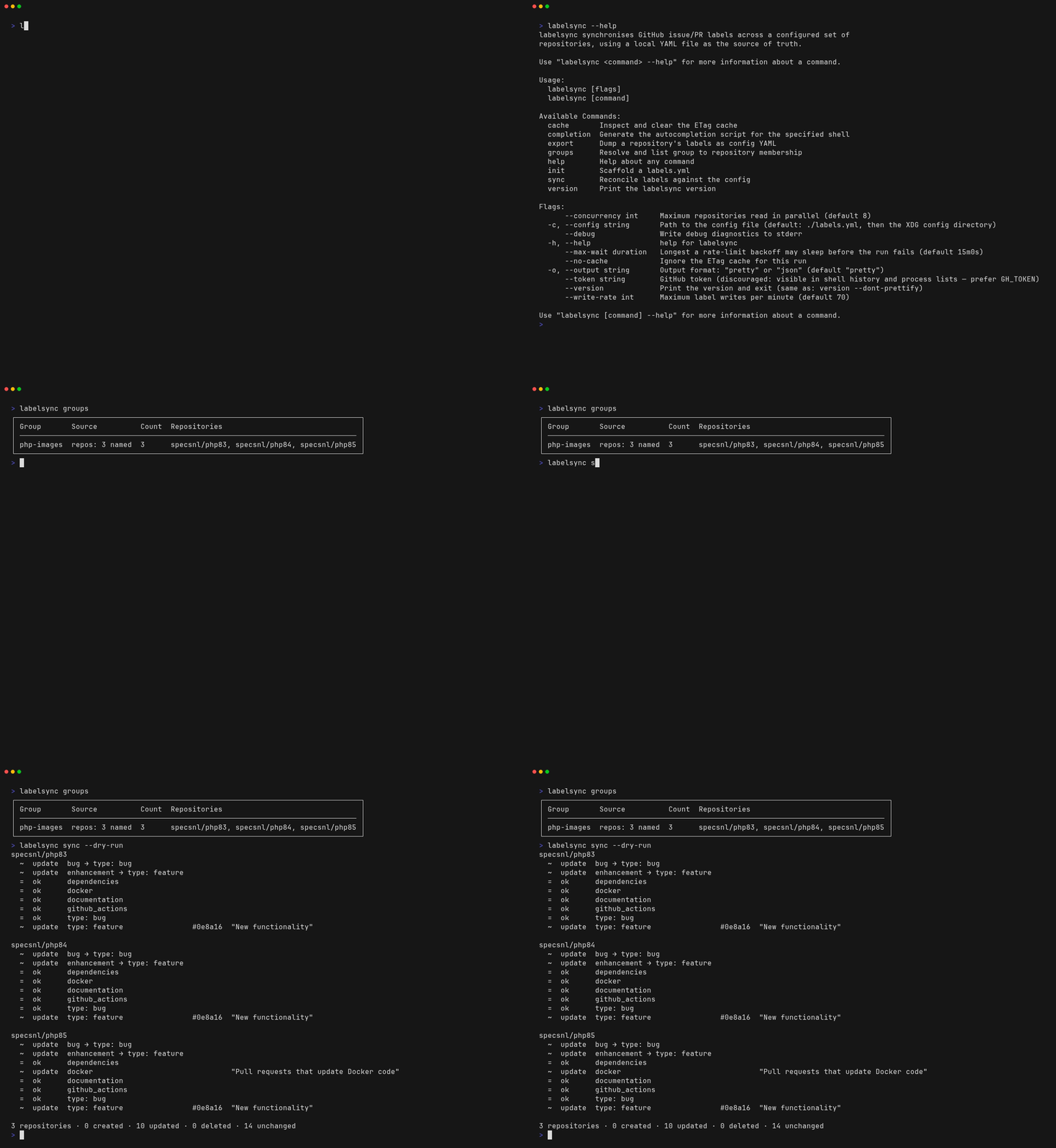
That is steps 4 and 5 below, recorded against three public repositories.
1. Install
brew install specsnl/tap/labelsyncOr go install github.com/specsnl/labelsync@latest, or a tar.gz from the
releases page — Linux and macOS, amd64 and arm64.
labelsync versionOr track release candidates
Pre-releases ship as their own cask, so a stable install never gets upgraded onto one by accident:
brew install specsnl/tap/labelsync@rcThat cask follows the leading edge — whatever the most recent tag is, candidate or stable. brew upgrade therefore moves you off a candidate and onto the stable release that supersedes it, so
opting in means seeing what is next early, not being left behind on it.
Both casks provide a command named labelsync, so they cannot be installed side by side —
installing one over the other fails at link time. Switching back means uninstalling first:
brew uninstall labelsync@rc && brew install specsnl/tap/labelsyncPrefer the stable cask unless you are deliberately testing what is next; the details are in Distribution.
2. Have a token
labelsync never asks for a credential. If you are logged in with gh auth login, you already
have one and there is nothing to do:
gh auth statusOtherwise put a personal access token in GH_TOKEN — fine-grained with Read and write on
Issues for the repositories you intend to sync, or repo on a classic one. The full resolution
order is in Commands § Where the token comes from, and
CI needs its own token for reasons of its own: Running in CI.
3. Export what you already have
Do this first. A label’s description in the config file is authoritative: a label whose
description your config does not carry has its description cleared on the next sync. An export is
a faithful snapshot, so that never happens by accident.
labelsync export yourorg/yourrepo --out labels.ymlPick the repository whose labels are closest to what you want everywhere. What comes out is a
complete, valid config file — sorted by name, normalised the way the loader normalises, and
carrying a groups: section naming the repository it came from with a defaults.groups pointing
at it. It works as it lands.
Starting from nothing instead? labelsync init writes a worked example with an org group and a
repos group, a rename, and four labels. It is the right start only for repositories that have no
labels worth keeping.
One thing an export can produce that a config cannot contain: two labels sharing a colour. Colours must be unique across a config file. The export says so in a comment and warns on stderr, and until you change one of them, loading the file fails with
duplicate_label_color.
4. Say which repositories
Open labels.yml and replace the single-repository group the export wrote with the set you
actually want:
groups:
  ours:
    org: yourorg
    exclude: ["*-archive"]

defaults:
  groups: [ours]
Then check what that selects, before anything is written:
labelsync groupsstdout is the table of groups and their repositories; stderr explains every repository a filter removed, one line each, with the reason. A repository you expected and do not see is what this command exists to explain. Every field of every section is in Configuration file.
The rule underneath all of it: if no group selects a repository, labelsync never touches it.
5. Dry run
labelsync sync --dry-runNothing is written. You get the plan — creates, updates, and no-ops per repository — and an exit
code: 0 if everything already matches, 2 if there is drift.
Read it before the first apply, particularly the updates. An update that clears a description you meant to keep is exactly what step 3 was for, and this is where you would still catch it.
6. Apply
labelsync syncThe plan prints first, then the writes happen, then a line saying what actually happened:
2 repositories · 4 created · 0 updated · 0 deleted · 4 unchanged
applied: 4 created · 0 updated · 0 deleted · 0 unchanged
Nothing is deleted. Append mode — the default — creates what is missing and updates what has drifted, and has no path to a delete at all. Run it twice and the second run does nothing: that is what a reconciler means.
A large first run takes a while on purpose. Writes are paced to stay under GitHub’s content-creation limit, and a run that would need more requests than the rate-limit budget has left is refused before its first write rather than stopping halfway.
Where to go next
| You want to | Read |
|---|---|
Move bug onto type: bug, keeping its issues | Renaming labels |
| Remove labels the config does not mention | Removing labels |
| Run this on every merge, or on a schedule | Running in CI |
| Know what every config field does | Configuration file |
| Know why any of it works the way it does | Architecture |